crewrota docs
crewrota is a command line tool that runs Claude Code as one of your crew members.
A crew member is one Claude login in its own folder; a ship lets several members share history, so --resume finds a session another member started.
Install it with npm install -g crewrota, add a member with crew add <member>, and type crew to pick a member and start Claude.
Who it is for
Section titled “Who it is for”crewrota is for one person running their own Claude subscriptions.
If one plan runs out before your work does, you can keep each login signed in, carry your sessions across them, and see which one has room, without signing out and in again.
Your main ~/.claude login is never touched: each member has its own folder under ~/.crewrota/members/.
What it does
Section titled “What it does”- One screen to start.
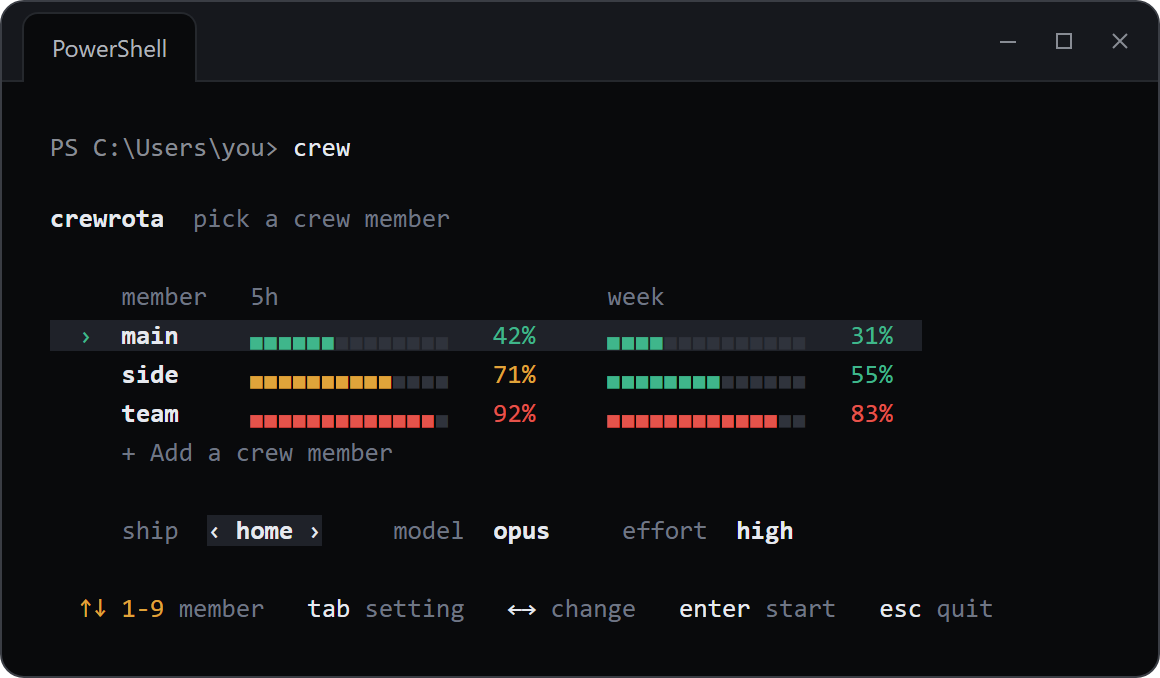
crewshows every member with its 5-hour and week bars; pick one, its ship, model and effort, and Claude Code opens as that login. - Usage at a glance.
crew quotain the terminal,crew widgeton your desktop, a menu bar item on macOS (beta). - Shared history. Members on the same ship share history, memory and MCP servers.
- Your setup in every member. Your skills, agents, commands, plugins, settings and
CLAUDE.mdcome with every member. - Backup and restore. One zip moves your ships, settings, skills and project
.claudefolders to a new machine. Logins are never in it. - firstmate. A Claude Code plugin that hands a task to other members running headless.
Your logins
Section titled “Your logins”crewrota never copies or moves a login; to read usage, quota-axi uses each member’s own sign-in on your machine. Each member signs in through Claude Code’s own login, and that login stays in the member’s folder. Read Your accounts and Anthropic’s terms before you use several accounts.
Where to start
Section titled “Where to start”Get started
Section titled “Get started”- Install crewrota
- Your first crew in five minutes
- Quickstarts: Windows, macOS (beta), Linux (beta)
- Platforms and versions
Guides
Section titled “Guides”- Add and manage crew members
- Share history between members with a ship
- Give a ship’s members the same MCP servers
- Check every member’s usage
- Keep usage on your desktop with the widget
- Show usage in the macOS menu bar
- Open a folder as a member from VS Code
- Move your crew to a new machine
- Use your main setup in every member
- Choose whether Claude asks for permission
- Fix a problem with crew doctor
Concepts
Section titled “Concepts”- Members, ships and your main setup
- What happens when a member launches
- Where usage readings come from