crew setup, crew init and crew doctor reference
crew setup installs the default tools from upstream after one list and one yes, crew init writes a project’s root .claude/ folder for the /firstmate skill, and crew doctor checks Node, Claude Code, your crew’s folders and links, and each default tool.
crew init and crew doctor never ask anything; crew setup needs a terminal unless you pass --yes.
crew setup
Section titled “crew setup”crew setup [--yes] [--with-hooks]| Flag | Default | What it does |
|---|---|---|
--yes |
off | Install without asking; also skips the Lavish telemetry question |
--with-hooks |
off | Also install the gh-axi and lavish-axi commands and their SessionStart hooks |
It prints every tool with the command it runs and where it lands, asks Install the N items above? (default yes), then installs what is missing.
Anything already installed is skipped and never updated.
The tools
Section titled “The tools”| Tool | Command | Lands in | Counted as installed when |
|---|---|---|---|
| lavish skill | npx skills add kunchenguid/lavish-axi --skill lavish -g |
~/.claude/skills/lavish |
that folder exists |
| gh-axi skill | npx skills add kunchenguid/gh-axi --skill gh-axi -g |
~/.claude/skills/gh-axi |
that folder exists |
| quota-axi skill | npx skills add kunchenguid/quota-axi --skill quota-axi -g |
~/.claude/skills/quota-axi |
that folder exists |
| treehouse | irm https://kunchenguid.github.io/treehouse/install.ps1 | iex in PowerShell on Windows; curl -fsSL https://kunchenguid.github.io/treehouse/install.sh | sh elsewhere |
the treehouse command on your PATH |
treehouse is on PATH |
| playwright-cli | npm install -g @playwright/cli@latest, then playwright-cli install --skills run from your home folder |
the playwright-cli command and its skill in ~/.claude/skills |
playwright-cli is on PATH |
| playwright MCP | adds playwright (npx -y @playwright/mcp@latest) to each ship’s mcp.json that has none |
each such ship’s mcp.json |
every ship has it, or there are no ships |
gh-axi and lavish-axi commands (--with-hooks) |
npm install -g gh-axi lavish-axi |
global npm packages | both are on PATH |
gh-axi session hook (--with-hooks) |
gh-axi setup hooks |
a SessionStart hook in ~/.claude/settings.json |
the hooks in that file mention gh-axi |
lavish-axi session hook (--with-hooks) |
lavish-axi setup hooks |
a SessionStart hook in ~/.claude/settings.json |
the hooks in that file mention lavish-axi |
Skills land in ~/.claude/skills, which every member links.
The --with-hooks items are the only ones that write to ~/.claude/settings.json, and they do it through the upstream tools’ own commands.
After the installs
Section titled “After the installs”- In a terminal and without
--yes, it asks once:Let lavish-axi send its usage telemetry? (No sets LAVISH_AXI_TELEMETRY=0 for every launch). The answer is saved aslavishTelemetry. - It runs
gh auth statusand only reports it. It never runsgh auth login; sign in to GitHub yourself. - A step that fails prints
[!] <tool>: <command> did not finish. Run it yourself to see why.and the exit code is 1.
Without a terminal
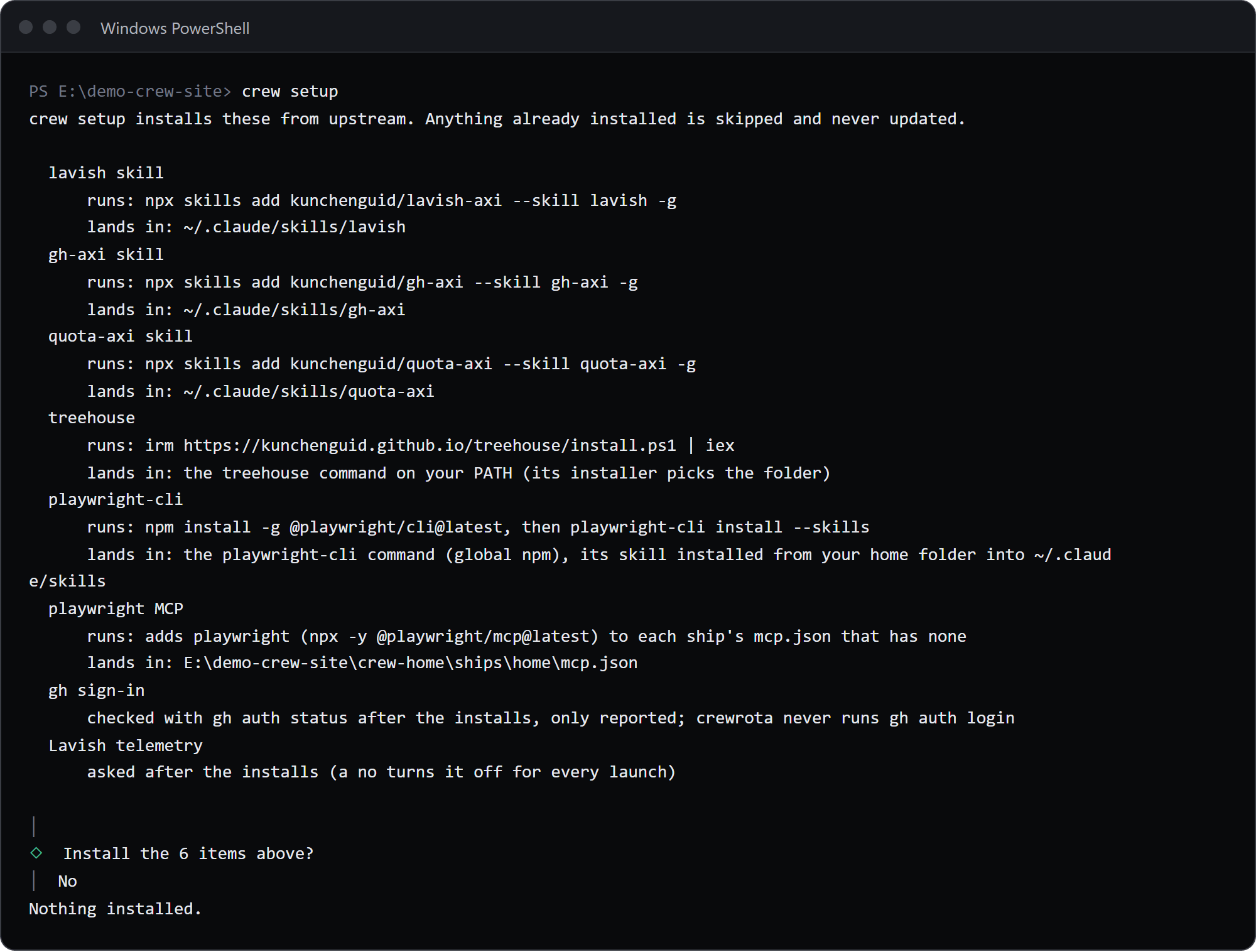
Section titled “Without a terminal”$ crew setup
crew setup installs these from upstream. Anything already installed is skipped and never updated.
lavish skill runs: npx skills add kunchenguid/lavish-axi --skill lavish -g lands in: ~/.claude/skills/lavish gh-axi skill runs: npx skills add kunchenguid/gh-axi --skill gh-axi -g lands in: ~/.claude/skills/gh-axi quota-axi skill runs: npx skills add kunchenguid/quota-axi --skill quota-axi -g lands in: ~/.claude/skills/quota-axi treehouse runs: irm https://kunchenguid.github.io/treehouse/install.ps1 | iex lands in: the treehouse command on your PATH (its installer picks the folder) playwright-cli runs: npm install -g @playwright/cli@latest, then playwright-cli install --skills lands in: the playwright-cli command (global npm), its skill installed from your home folder into ~/.claude/skills playwright MCP runs: adds playwright (npx -y @playwright/mcp@latest) to each ship's mcp.json that has none lands in: E:\demo-crew-inventory\crew-home\ships\home\mcp.json gh sign-in checked with gh auth status after the installs, only reported; crewrota never runs gh auth login Lavish telemetry asked after the installs (a no turns it off for every launch)
crewrota: crew setup asks once before it installs anything, and that needs a terminal. Run it in a terminal, or pass --yes to install without asking.
[exit code 1]The list prints first, so a script or an agent can show it to you before anyone passes --yes.
When everything is installed it prints Everything is installed already. Nothing to do. and needs no answer.
crew init
Section titled “crew init”Write a project’s root .claude/ folder into the current folder.
crew initNo flags or arguments; anything extra fails with Usage: crew init.
$ crew init
[OK] created .claude\CLAUDE.md[OK] created .claude\crewrota.json[OK] created .claude\memories\README.md[OK] created .claude\skills\README.md[OK] created .claude\tasks\INDEX.mdThe project's .claude/ folder is ready in E:\demo-crew-inventory\proj\site
[exit code 0]| File | What it is |
|---|---|
.claude/crewrota.json |
{ "version": 1, "routing": [] }: marks the project root for /firstmate, and holds its routing rules |
.claude/CLAUDE.md |
A short project guide to fill in; skipped when the project already has a root CLAUDE.md |
.claude/memories/README.md |
The index of the project’s memories |
.claude/skills/README.md |
Where project skills go |
.claude/tasks/INDEX.md |
The index of task folders |
- It never overwrites a file: one that exists prints
[i] left alone <file> (already there), and a rootCLAUDE.mdgives[i] left alone .claude\CLAUDE.md (the project has a CLAUDE.md). - Run again with every file in place, it prints
Nothing to create: <folder> already has every file. - crewrota’s own commands do not read these files; the
/firstmateskill does. See firstmate.
crew doctor
Section titled “crew doctor”Check the setup.
crew doctor [--logins]| Flag | Default | What it does |
|---|---|---|
--logins |
off | Also run claude auth status in each member’s folder |
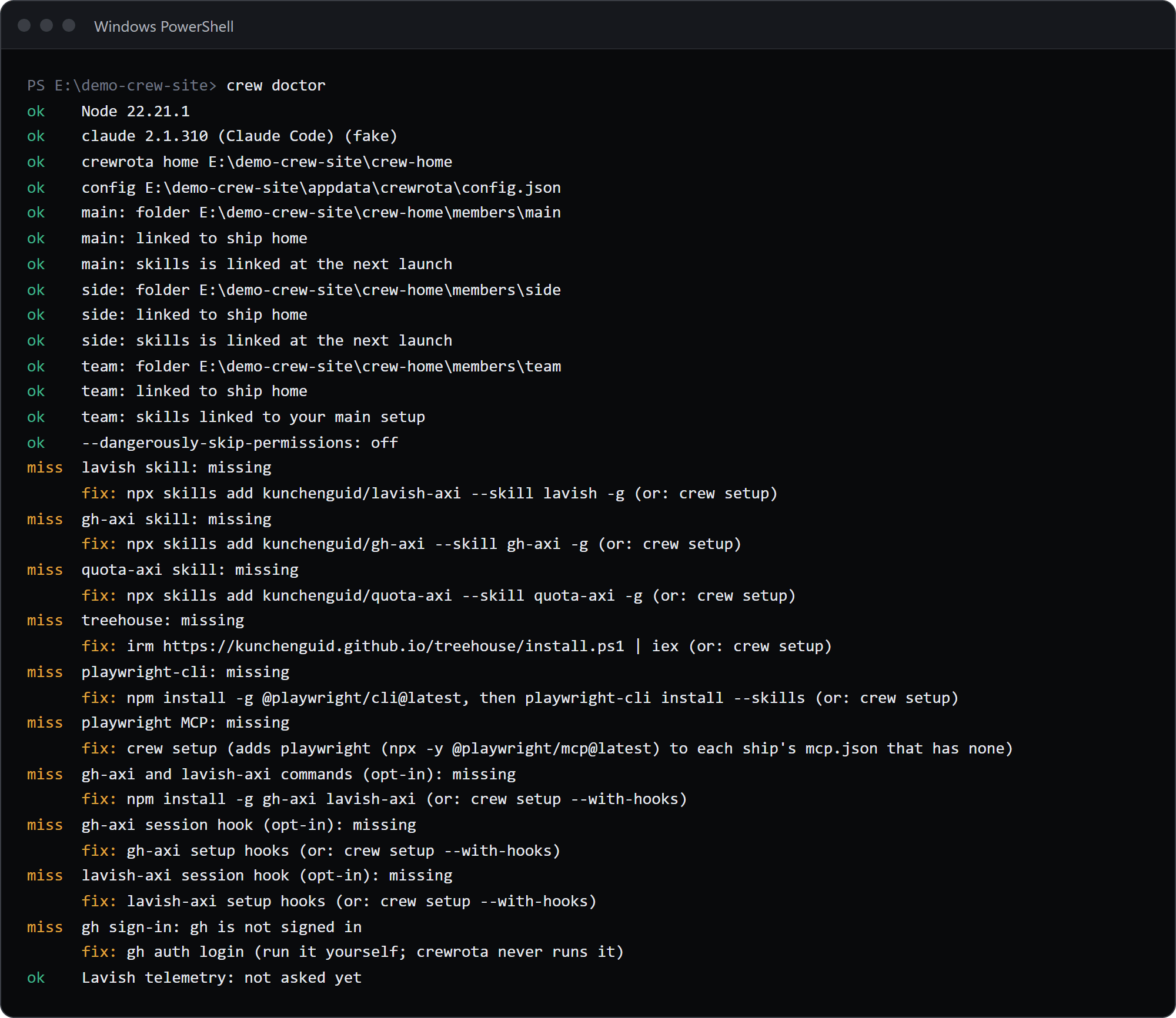
$ crew doctor
ok    Node 22.21.1ok    claude 2.1.310 (Claude Code) (fake)ok    crewrota home E:\demo-crew-pages1\crew-homeok    config E:\demo-crew-pages1\appdata\crewrota\config.jsonok    main: folder E:\demo-crew-pages1\crew-home\members\mainok    main: linked to ship homeok    side: folder E:\demo-crew-pages1\crew-home\members\sideok    side: linked to ship homeFAIL  team: folder E:\demo-crew-pages1\crew-home\members\team is missing      fix: Log it in again with: crew login team (or drop it with: crew drop team)ok    --dangerously-skip-permissions: offmiss  lavish skill: missing      fix: npx skills add kunchenguid/lavish-axi --skill lavish -g (or: crew setup)miss  gh-axi skill: missing      fix: npx skills add kunchenguid/gh-axi --skill gh-axi -g (or: crew setup)miss  quota-axi skill: missing      fix: npx skills add kunchenguid/quota-axi --skill quota-axi -g (or: crew setup)miss  treehouse: missing      fix: irm https://kunchenguid.github.io/treehouse/install.ps1 | iex (or: crew setup)miss  playwright-cli: missing      fix: npm install -g @playwright/cli@latest, then playwright-cli install --skills (or: crew setup)miss  playwright MCP: missing      fix: crew setup (adds playwright (npx -y @playwright/mcp@latest) to each ship's mcp.json that has none)miss  gh-axi and lavish-axi commands (opt-in): missing      fix: npm install -g gh-axi lavish-axi (or: crew setup --with-hooks)miss  gh-axi session hook (opt-in): missing      fix: gh-axi setup hooks (or: crew setup --with-hooks)miss  lavish-axi session hook (opt-in): missing      fix: lavish-axi setup hooks (or: crew setup --with-hooks)miss  gh sign-in: gh is not signed in      fix: gh auth login (run it yourself; crewrota never runs it)ok    Lavish telemetry: not asked yet
[exit code 1]
Each line starts with ok, miss (an optional tool, never a failure) or FAIL, and a line that is not ok has a fix: line under it.
The checks
Section titled “The checks”| Check | ok when | Fix it points to |
|---|---|---|
| Node | the major version is 22 or newer | Install Node.js 22 or newer from nodejs.org |
| claude | claude --version runs (on Windows also through cmd.exe for an npm shim) |
Install Claude Code: the PowerShell installer or winget on Windows, the shell installer or Homebrew on macOS, the shell installer on Linux |
| crewrota home | the folder can be read, or does not exist yet | Check its permissions |
| config | config.json parses, or does not exist yet |
Fix the JSON, or rename the file |
| each member’s folder | it exists | crew login <member>, or crew drop <member> |
| each member’s ship link | projects and the other ship folders point at the ship |
crew run <member>, which repairs links before every launch |
each member’s skills, agents, commands |
linked to ~/.claude, or linked at the next launch |
crew run <member>; move a real folder that is in the way first |
| permissions | always ok; shows on, off or not asked yet |
|
| VS Code | found, checked only when you have shortcuts | Install VS Code; on macOS also its code command |
logins (--logins) |
claude auth status exits with 0 in the member’s folder |
crew login <member> |
| each default tool, gh sign-in, Lavish telemetry | installed; reported as miss, never a failure |
the crew setup line for it, or gh auth login |
Exit code
Section titled “Exit code”0 unless a check that is not optional fails; missing tools never fail it.
In the example above, the missing member folder is the one FAIL, so it exits with 1.