Give a ship's members the same MCP servers
Each ship keeps one list of MCP servers in its mcp.json, and every member on the ship gets that list at each launch.
Add one with crew ship mcp add <ship> <name> --url <url> for a remote server, or crew ship mcp add <ship> <name> -- <command> [args] for a local one.
At every launch crewrota replaces the member’s own MCP list with the ship’s, so add servers to the ship, not inside the member.
Add a remote server
Section titled “Add a remote server”crew ship mcp add home docs --url https://mcp.example.com/mcp --header "Authorization: Bearer EXAMPLE"Added docs to ship home. Its members get it at their next launch.| Flag | What it sets |
|---|---|
--url <url> |
The server’s address |
--transport <type> |
The server’s type in mcp.json; the default is http. Use it for another transport, such as sse |
--header "Name: value" |
One request header; repeat it for more |
With --transport:
crew ship mcp add home events --url https://mcp.example.com/sse --transport sseAdded events to ship home. Its members get it at their next launch.Add a local server
Section titled “Add a local server”Put the command after --:
crew ship mcp add home files --env ROOT=/tmp -- npx -y @example/files-mcp /tmpAdded files to ship home. Its members get it at their next launch.--env KEY=value sets one environment variable for the server; repeat it for more.
The server is saved with type stdio.
Copy a server from another config file
Section titled “Copy a server from another config file”crew ship mcp add home docs --from ~/.claude.jsonThis copies the server named docs from that file’s mcpServers, keys included.
If the file has no such server: <file> has no MCP server docs.
List a ship’s servers
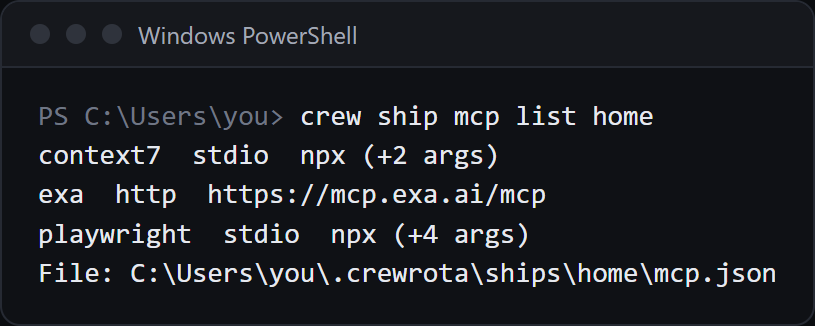
Section titled “List a ship’s servers”crew ship mcp list homedocs http https://mcp.example.com/mcpfiles stdio npx (+3 args)File: E:\demo-crew-inventory\crew-home\ships\home\mcp.jsonThe list never prints headers, environment values or the part of a URL after ?, which is where keys usually sit.
With none: Ship home has no MCP servers. Add one with: crew ship mcp add home <name> ...
Remove a server
Section titled “Remove a server”crew ship mcp remove home filesRemoved files from ship home. Its members lose it at their next launch.Your member’s own MCP list is replaced at launch
Section titled “Your member’s own MCP list is replaced at launch”Before every launch, crewrota writes the ship’s servers into the member’s .claude.json as its mcpServers, replacing what was there.
So a server you add inside a member with claude mcp add --scope user is gone at that member’s next launch.
Add it to the ship instead, with crew ship mcp add.
An isolated member (on no ship) gets the servers from your main ~/.claude.json instead, when that file has any.
For a server that belongs to one repo, use Claude Code’s own .mcp.json in that repo (claude mcp add --scope project); crewrota does not touch it.
Write its keys as ${VAR} and set the variable in your shell before you run crew.
Keys stay on your machine
Section titled “Keys stay on your machine”mcp.json holds the servers’ keys as you gave them, in the ship’s folder (~/.crewrota/ships/<ship>/mcp.json), with mode 0600 on macOS and Linux.
crew backup includes each ship’s mcp.json and warns when there is no password:
[!] The backup holds the MCP servers of home with their keys in plain text. Add --password to encrypt it.Errors
Section titled “Errors”| You ran | crew says |
|---|---|
Both --url and a command |
Give either --url or a command after --, not both. |
| Neither | Give --url <url> for an HTTP server, or -- <command> [args] for a local one. |
--header without a colon |
--header takes "Name: value". |
--env without = |
--env takes KEY=value. |
| A missing ship | Ship <ship> doesn't exist |
| Removing a name the ship lacks | Ship <ship> has no MCP server <name> |
Add the Playwright server to every ship
Section titled “Add the Playwright server to every ship”crew setup adds playwright (npx -y @playwright/mcp@latest) to each ship’s mcp.json that has none, after asking once.