Check every member's usage
crew quota shows every member’s 5-hour and week use as bars, and the crew menu shows the same bars above its members.
Both read usage with quota-axi first, one call per member side by side, and send no message.
crew warmup is the only command that sends a message: one short Haiku message per member, which starts its 5-hour window if none is running.
Read the bars
Section titled “Read the bars”crew quotacrewrota crew quota
member 5h week main ▖▖▖▖▖▖▖▖▖▖▖▖▖▖ 30% ▖▖▖▖▖▖▖▖▖▖▖▖▖▖ 55% side ▖▖▖▖▖▖▖▖▖▖▖▖▖▖ 30% ▖▖▖▖▖▖▖▖▖▖▖▖▖▖ 55% team ▖▖▖▖▖▖▖▖▖▖▖▖▖▖ 30% ▖▖▖▖▖▖▖▖▖▖▖▖▖▖ 55%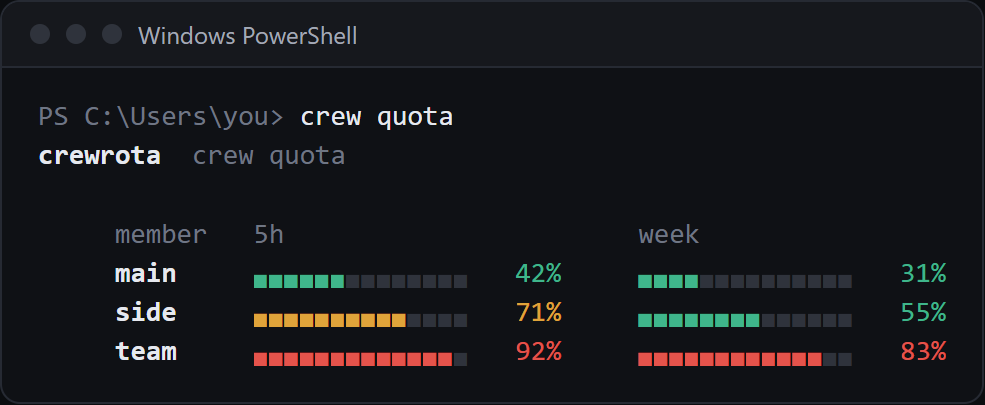
- Each bar has 14 cells. It is green under 60%, amber from 60% and red from 80%.
- A window whose reset time has passed since the reading shows 0%.
-means that window has no reading;no reading yetmeans the member has none at all.- The colour is only there in a terminal. Piped into a file or another program, the bars are plain, so only the
N%columns mean anything; the text block above is such a copy.
crew list shows the same readings in short form, with their age, and never checks usage first:
* main home 5h 30% 7d 55% (just now) main@example.com (personal)When readings are taken
Section titled “When readings are taken”| What | Sends a message | Writes the reading |
|---|---|---|
| The crew menu opening | No | yes, for every member, through quota-axi, unless crew config refresh off |
crew quota |
No | yes, for every member, through quota-axi, unless crew config refresh off |
| A running Claude session, through crewrota’s status line | No | yes, for that member |
crew warmup |
Yes, one short Haiku message per member | yes, for each member it warms up |
crew list, crew quota --format menubar, the widget |
No | no, they only read |
Each reading is saved to quota.json in the member’s folder.
A member whose check fails keeps its last reading.
See Where usage readings come from.
Turn the check off
Section titled “Turn the check off”While the menu checks usage, a terminal shows Checking usage for <members> (crewrota reads each member's usage; stop it with: crew config refresh off)... until the readings are in.
crew config refresh offThe menu shows each member's last reading.With it off, the menu and crew quota show each member’s last reading without asking quota-axi.
crew config refresh on turns it back on (the default).
Start an idle member’s window
Section titled “Start an idle member’s window”crew warmup sends each member one short message, which starts its 5-hour window if none is running, so the window is already counting when you need that member:
crew warmup team[i] Each member gets one short message (Haiku), which starts its 5-hour window if none is running.crewrota crew quota
member 5h week main ▖▖▖▖▖▖▖▖▖▖▖▖▖▖ 30% ▖▖▖▖▖▖▖▖▖▖▖▖▖▖ 55% side ▖▖▖▖▖▖▖▖▖▖▖▖▖▖ 30% ▖▖▖▖▖▖▖▖▖▖▖▖▖▖ 55% team ▖▖▖▖▖▖▖▖▖▖▖▖▖▖ 12% ▖▖▖▖▖▖▖▖▖▖▖▖▖▖ 48%With no names it warms up every member. Each message runs in a temporary folder with no session saved, none of the member’s settings, hooks or MCP servers, and stops as soon as Claude Code reports usage (or after 30 seconds). The message counts against that member’s usage, so run it only when you mean to. The widget’s bolt button runs the same command.
Read the bars elsewhere
Section titled “Read the bars elsewhere”- On your desktop: Keep usage on your desktop with the widget.
- In the macOS menu bar (beta): Show usage in the macOS menu bar.
- Inside a Claude session: the status line crewrota gives a member without one shows
5h:N%and7d:N%. See Use your main setup in every member.
For scripts
Section titled “For scripts”crew quota and crew list print text for people; there is no --json.
A script can read each member’s quota.json directly:
{"ts":1793796958,"seen":1793796958,"five_hour_pct":30,"seven_day_pct":55,"five_hour_resets_at":2000000000,"seven_day_resets_at":2000604800}ts is when the reading was saved, the _pct fields are percentages used, and the _resets_at fields are Unix times in seconds; any of them can be an empty string when unknown.
See Files and folders.