crew menu and crew run reference
crew with no arguments opens the menu, where you pick a member, its ship, a model and an effort, then start Claude Code as that member.
crew run <member> and its short form crew <member> start a member without the menu, with its remembered model, effort and ship, and work without a terminal once the permissions question is answered.
Anything after -- goes to Claude Code.
crew (the menu)
Section titled “crew (the menu)”Pick a member and its settings on one screen, then start Claude Code.
crewNo flags.
It needs a terminal; without one it prints The menu needs a terminal. Without one, use: crew run <member> and exits with 1.
What the screen shows
Section titled “What the screen shows”With at least one member, the menu is one screen:
- a row per member, sorted by name, with its 5-hour and week bars;
+ Add a crew memberunder the members;- one settings line:
ship,modelandeffort; - a key line at the bottom.
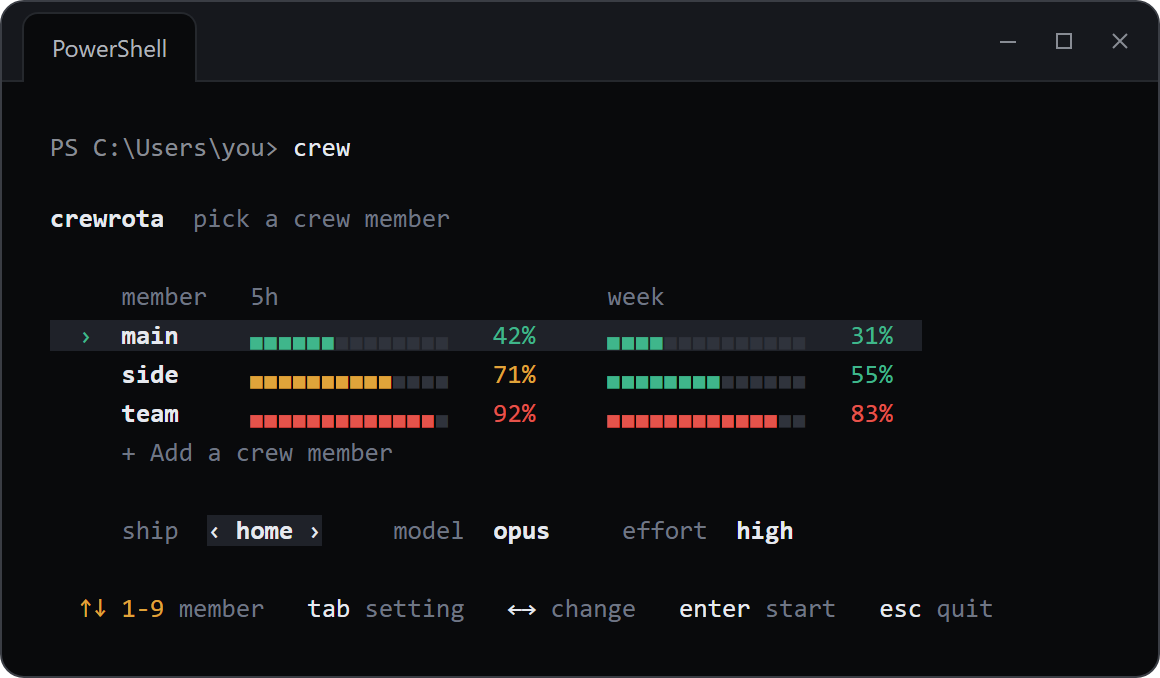
The cursor starts on the current member.
Each bar has 14 cells: green under 60%, amber from 60% and red from 80%.
A window whose reset time has passed since the reading shows 0%.
A member with no reading shows no reading yet.
| Key | What it does |
|---|---|
| Up and down | Move between members and + Add a crew member |
1 to 9 |
Jump to that member |
| Tab, Shift+Tab | Move between ship, model and effort |
| Left and right | Change the setting the cursor is on |
| Enter | Start, or add a member when + Add a crew member is picked |
| Esc | Quit; prints Nothing launched. and exits with 0 |
Moving to another member loads that member’s remembered ship, model and effort.
Settings
Section titled “Settings”| Setting | Values | Default |
|---|---|---|
ship |
isolated, then every ship by name |
the member’s ship, else isolated |
model |
Claude's default, fable, opus, sonnet, a model the member used before, type a name |
the member’s last model, else the last model used, else Claude's default |
effort |
Claude's default, low, medium, high, xhigh, max |
the member’s last effort, else the last effort used, else Claude's default |
type a name asks Model name (an alias or a full model name) after you press Enter.
Claude's default passes no --model or --effort, so Claude Code uses its own default.
Picking a ship other than the member’s saved one joins that ship (or leaves it, for isolated) before Claude starts.
Before the screen opens
Section titled “Before the screen opens”Unless crew config refresh off is set, the menu first reads every member’s usage with quota-axi, side by side, and prints Checking usage for <who> (crewrota reads each member's usage; stop it with: crew config refresh off)... until it is done.
No message is sent to any member.
Step-by-step mode
Section titled “Step-by-step mode”With no members yet, the menu asks one question at a time: No crew members yet, then the new member’s name, the login and the “Share history” question from crew add, then the model and the effort.
It does the same for screen readers: when the ACCESSIBLE environment variable is set to any value other than 0 or false, the menu skips the one-screen view and the usage check and asks Crew member, Model and Effort as separate questions.
The first launch
Section titled “The first launch”The first time any member starts, crewrota shows a note headed “Skip permission prompts?” and asks once: Start sessions with --dangerously-skip-permissions?
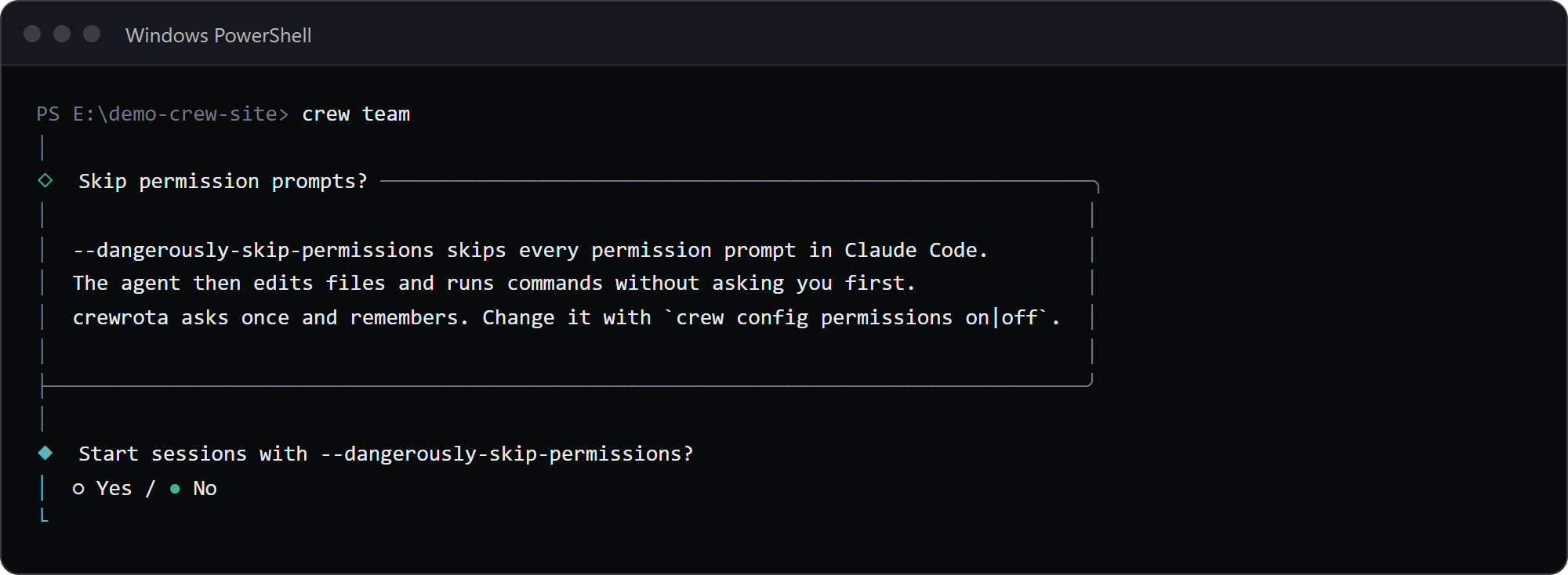
The default is No. The answer is saved only once Claude Code has started. See Choose whether Claude asks for permission.
What it writes
Section titled “What it writes”On start it saves the member’s model and effort, the last model and effort, and the permissions answer in config.json, and a ship change.
crew run
Section titled “crew run”Start Claude Code as a member, without the menu.
crew run [<member>] [-- <claude args>]| Argument | Default | What it is |
|---|---|---|
<member> |
$CREW_MEMBER, else the current member |
The member to start |
-- <claude args> |
none | Passed to Claude Code after crewrota’s own flags |
crew run has no flags of its own.
Which member starts
Section titled “Which member starts”- The
<member>you name. - Else the
CREW_MEMBERenvironment variable. - Else the current member (
crew use <member>sets it).
With none of these, it fails:
$ crew run
crewrota: No crew member chosen. Pick one with: crew use <member>
[exit code 1]
An unknown member:
$ crew run ghost
crewrota: Crew member ghost doesn't exist. Create it with: crew add ghost
[exit code 1]
The Claude command line
Section titled “The Claude command line”crewrota runs claude with this argument list:
[--model <model>] [--effort <effort>] [--dangerously-skip-permissions] <claude args>--modeland--effortcome from the member’s remembered choice, and are left out when it isdefault.--dangerously-skip-permissionsis added whencrew config permissions onis set.CLAUDE_CONFIG_DIRis set to the member’s folder, andLAVISH_AXI_TELEMETRY=0is added when Lavish telemetry is off.- Claude starts in the folder you ran
crewfrom.
For example, with permissions on and the model and effort at their defaults, crew main -- --resume abc runs claude --dangerously-skip-permissions --resume abc with CLAUDE_CONFIG_DIR at main’s folder.
Before Claude starts
Section titled “Before Claude starts”crewrota checks the member’s folder, repairs its ship links, links and copies your main setup into it, copies the ship’s MCP servers into its .claude.json, and gives it crewrota’s status line if it has none.
Anything worth knowing prints as [i] lines on stdout before Claude starts.
The steps are in What happens when a member launches.
A member whose folder is gone fails:
crewrota: The folder of crew member team is missing: E:\demo-crew-pages1\crew-home\members\team. Log it in again with: crew login teamWithout a terminal
Section titled “Without a terminal”crew run works from a script or an agent once the permissions question has an answer.
Before that it prints these two lines to stderr and exits with 1:
$ crew run main -- -p hi
crewrota asks once whether to use --dangerously-skip-permissions, and that needs a terminal.Answer it now with: crew config permissions on   (or off)
[exit code 1]
A headless run, with Claude’s JSON written to a file:
crew run main -- -p "Summarise README.md in one line" --output-format json > run.jsonThe [i] lines, when there are any, come before Claude’s JSON in the same output.
Exit code
Section titled “Exit code”crew run exits with Claude Code’s own exit code.
Ctrl+C goes to Claude while it runs.
When Claude cannot be started at all, crewrota prints crewrota: could not start claude: <reason> and exits with 1.
crew <member>
Section titled “crew <member>”The short form of crew run <member>.
crew <member> [-- <claude args>]It works when <member> is the name of a member; any other word is an unknown command, which prints Unknown command: <word> and the help, and exits with 1.
Everything else is crew run.
The -- rule
Section titled “The -- rule”crewrota reads every argument before -- as its own.
A Claude flag there is an unknown option:
$ crew main --resume abc
crewrota: Unknown option: --resume[exit code 1]
Put Claude’s flags after --:
crew main -- --resume abccrew run side -- -p "Reply with READY" --output-format jsonA session started by one member can be resumed by another member on the same ship, because they share the projects folder.
See Resume a session from another member.