Keep usage on your desktop with the widget
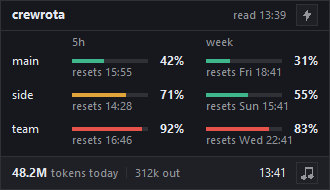
crew widget opens a small always-on-top window with every member’s 5-hour and week bars.
crew widget close closes it, and on Windows crew widget startup on opens it at every login.
It needs Python 3 with Tk; the python.org installer includes both.
Open it
Section titled “Open it”crew widget[OK] The widget is open. Its bolt warms up every member; right-click it to refresh or quit; close it with: crew widget closeIf it is already open: [i] The widget is already open. Close it with: crew widget close
The widget runs on its own, so you can close the terminal. Drag it anywhere; it remembers its place.
What it shows
Section titled “What it shows”- One row per member, with its 5-hour and week bars, each with a percentage and its reset time. The colours match
crew quota: green under 60%, amber from 60%, red from 80%. - The age of the readings in the title row, as
read HH:MMfor the newest reading, orno readings yet. - Dimmed rows for a member whose last reading is more than 6 hours old.
- Today’s tokens across the crew in the footer, summed from every member’s session transcripts, with the output tokens beside them.
- The clock, a music button that opens a coding-music stream on YouTube, and a bolt button.
It only reads: the bars come from each member’s quota.json, the same file crew quota and crew list read.
It redraws every 30 seconds, and at once when a newer reading lands.
Warm up every member
Section titled “Warm up every member”The bolt button, or Warm up all in the right-click menu, runs crew warmup.
That sends each member one short Haiku message, which starts its 5-hour window if none is running; it is the only crewrota command that sends a message.
The title row shows warming up... until it is done.
Right-click menu
Section titled “Right-click menu”| Item | What it does |
|---|---|
| Warm up all | Runs crew warmup for every member |
| Refresh | Redraws from the latest readings |
| Quit | Closes the widget |
Close it
Section titled “Close it”crew widget close| Result | Output | Exit code |
|---|---|---|
| Closed | [OK] Closed the widget. |
0 |
| Not open | [i] The widget is not open. |
0 |
| Still open after 5 seconds | [!] The widget did not close within 5 seconds. Right-click it and pick Quit. |
1 |
Open it at login (Windows)
Section titled “Open it at login (Windows)”crew widget startup oncrew widget startup off[OK] The widget no longer opens at login.on adds crewrota widget.lnk to your Startup folder (%APPDATA%\Microsoft\Windows\Start Menu\Programs\Startup); off removes it.
On macOS and Linux it stops with Opening the widget at login is Windows-only for now; macOS gets a menu bar item later.
On macOS, use the menu bar plugin instead.
Python
Section titled “Python”| Platform | crewrota looks for |
|---|---|
| Windows | pythonw, then pyw, so no console window opens |
| macOS and Linux | python3 |
Set CREWROTA_PYTHON to the full path of another Python to use that one.
With none found: The widget needs Python 3 with Tk (the python.org installer includes both). Install it, then try again.
crewrota checks only that Python is there: if Python has no Tk, the command still reports the widget open, but no window appears.
Check that your Python can import tkinter.
Beta: on macOS and Linux crewrota starts the widget with
python3the same way, but it has not yet been tested there by hand.
Files it uses
Section titled “Files it uses”All in your crew home (~/.crewrota by default):
| File | What it holds |
|---|---|
widget.pid |
The widget’s process id while it is open |
widget.json |
Its saved position |
widget.close |
Written by crew widget close to ask it to quit |