crew quota, warmup, widget and statusline reference
crew quota shows every member’s 5-hour and week use as bars, crew quota --format menubar prints the same for a macOS menu bar app, crew widget keeps it on your desktop, and crew statusline is the status line crewrota gives a member that has none.
crew warmup is the only crewrota command that sends a message: one short Haiku message per member.
Every reading lands in the member’s own quota.json.
crew quota
Section titled “crew quota”Every member’s usage as bars.
crew quotaNo flags other than --format menubar below; anything else fails with Usage: crew quota [--format menubar] (exit 1).
$ crew quota
crewrota  crew quota
     member   5h                       week     main     ▖▖▖▖▖▖▖▖▖▖▖▖▖▖   86%     ▖▖▖▖▖▖▖▖▖▖▖▖▖▖   71%     side     ▖▖▖▖▖▖▖▖▖▖▖▖▖▖   12%     ▖▖▖▖▖▖▖▖▖▖▖▖▖▖   34%     team     ▖▖▖▖▖▖▖▖▖▖▖▖▖▖   47%     ▖▖▖▖▖▖▖▖▖▖▖▖▖▖   62%
[exit code 0]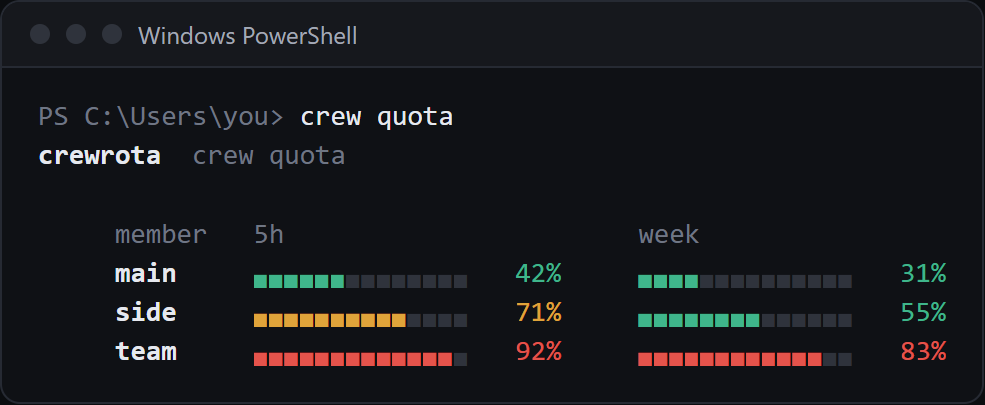
- Unless
crew config refresh offis set, it first reads every member’s usage with quota-axi, one call per member, side by side. quota-axi sends no message. A member whose reading fails keeps its last one. - In a terminal the filled part of each bar is coloured: green under 60%, amber from 60%, red from 80%. Piped, the output has no colour, so only the percentages carry the numbers.
- A member with no reading shows
no reading yet; a window whose reset time has passed shows 0%. - With no members it prints
No crew members yet. Add one with: crew add <member>. - It has no
--json; a script reads each member’squota.jsoninstead (see Files and folders).
crew quota –format menubar
Section titled “crew quota –format menubar”The same readings as SwiftBar and xbar text.
crew quota --format menubar$ crew quota --format menubar
crew 30%---main | font=Helvetica-Bold5h 30% resets 09:03 | color=#3fb68bweek 55% resets Wed 09:03 | color=#3fb68bside5h 30% resets 09:03 | color=#3fb68bweek 55% resets Wed 09:03 | color=#3fb68bteam5h 30% resets 09:03 | color=#3fb68bweek 55% resets Wed 09:03 | color=#3fb68b---Open the crew menu | shell="C:\Program Files\nodejs\node.exe" param1="E:\Projects\startup\crewrota\dist\cli.js" terminal=trueRefresh | refresh=true
[exit code 0]- The first line is
crew <N>%, the current member’s 5-hour use, orcrewwhen there is no reading. - Each member’s name (bold for the current one), then a
5hand aweekline with the reset time and a colour:#3fb68bunder 60%,#e0a43afrom 60%,#e5534bfrom 80%. - The last two lines open the crew menu in a terminal and refresh the plugin.
- It never checks usage: it reads
quota.jsononly, because a menu bar app runs it every minute. widget/crewrota.1m.shin the package runs it. See Show usage in the macOS menu bar (beta).
crew warmup
Section titled “crew warmup”Send each member one short message, which starts its 5-hour window if none is running, then show the bars.
crew warmup [<member>...]| Argument | Default | What it is |
|---|---|---|
<member>... |
every member | Only these members |
$ crew warmup team
[i] Each member gets one short message (Haiku), which starts its 5-hour window if none is running.crewrota  crew quota
     member   5h                       week     main     ▖▖▖▖▖▖▖▖▖▖▖▖▖▖   30%     ▖▖▖▖▖▖▖▖▖▖▖▖▖▖   55%     side     ▖▖▖▖▖▖▖▖▖▖▖▖▖▖   30%     ▖▖▖▖▖▖▖▖▖▖▖▖▖▖   55%     team     ▖▖▖▖▖▖▖▖▖▖▖▖▖▖   12%     ▖▖▖▖▖▖▖▖▖▖▖▖▖▖   48%
[exit code 0]- It is the only crewrota command that sends a message, and it counts against each member’s quota.
- Per member it runs
claude -p ok --model haiku --output-format stream-json --verbose --no-session-persistence --setting-sources project --strict-mcp-config --disable-slash-commandsin the system temp folder withCLAUDE_CONFIG_DIRat the member’s folder. The run is saved nowhere and loads none of the member’s settings, hooks or MCP servers. - It stops each run as soon as Claude Code reports the usage, and gives up on a member after 30 seconds.
- An unknown member fails before anything is sent:
Crew member ghost doesn't exist. Create it with: crew add ghost(exit 1).
crew widget
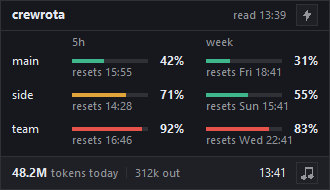
Section titled “crew widget”Open the quota widget: every member’s bars in a small always-on-top window.
crew widget[OK] The widget is open. Its bolt warms up every member; right-click it to refresh or quit; close it with: crew widget closeWhen it is already open: [i] The widget is already open. Close it with: crew widget close.
- It needs Python 3 with Tk. crewrota looks for
pythonw, thenpywon Windows, andpython3elsewhere;CREWROTA_PYTHONnames another. Without one it fails withThe widget needs Python 3 with Tk (the python.org installer includes both). Install it, then try again. - It starts
widget/crewrota-widget.pywdetached, so the terminal is free at once. - The widget redraws every 30 seconds, dims a reading older than six hours, and sums today’s tokens from every member’s transcripts. Its bolt, and Warm up all in its right-click menu, run
crew warmupfor every member; Refresh redraws it and Quit closes it. - It writes
widget.pidwhile open andwidget.json(its position) in the crew home.
More in Keep usage on your desktop with the widget.
crew widget close
Section titled “crew widget close”crew widget closeIt asks the widget to close through a widget.close file in the crew home and waits up to 5 seconds.
| Output | Exit code |
|---|---|
[OK] Closed the widget. |
0 |
[i] The widget is not open. |
0 |
[!] The widget did not close within 5 seconds. Right-click it and pick Quit. |
1 |
crew widget startup
Section titled “crew widget startup”Open the widget when you log in to Windows, or stop that.
crew widget startup oncrew widget startup off$ crew widget startup on
[OK] The widget opens at login, from E:\demo-crew-pages2\appdata\Microsoft\Windows\Start Menu\Programs\Startup\crewrota widget.lnk
[exit code 0]$ crew widget startup off
[OK] The widget no longer opens at login.
[exit code 0]onwritescrewrota widget.lnkin%APPDATA%\Microsoft\Windows\Start Menu\Programs\Startupthrough PowerShell, pointing at the Python it found.offdeletes it.- On macOS and Linux it fails with
Opening the widget at login is Windows-only for now; macOS gets a menu bar item later. - Any other
crew widgetargument fails withUsage: crew widget | crew widget close | crew widget startup on|off.
crew statusline
Section titled “crew statusline”The status line crewrota gives a member that has none of its own.
crew statuslineYou do not run it yourself: Claude Code runs it and pipes the session’s JSON to it.
At launch, a member whose settings.json has no statusLine gets this entry:
{ "statusLine": { "type": "command", "command": "crewrota statusline" }}A member that already has a status line, its own or one copied from your main setup, keeps it; a linked or unreadable settings.json is left alone.
Output, with NO_COLOR set and a sample session JSON on stdin:
$ echo <session JSON> | CLAUDE_CONFIG_DIR=<crew home>/members/team NO_COLOR=1 crew statusline
Opus 5.5 (1M) | ███░░░░░░░ 37% | main | 5h:42% | 7d:63% | ↻ 15:30 (0m) | crewrota | crew team[exit code 0]
- The parts: the model, the context bar, the git branch,
5h:and7d:use, the 5-hour reset with a countdown, the folder name, andcrew <member>(the name of the folder inCLAUDE_CONFIG_DIR). - Colours: green under 50%, yellow from 50%, red from 80%.
NO_COLORturns colour off and joins the parts with|. - With
CLAUDE_CONFIG_DIRset it saves the session’srate_limitstoquota.jsonin that folder; an older session never overwrites a newer reading. - It never fails: bad or missing input prints what it can and exits with 0.